


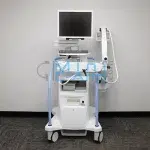
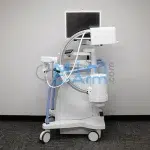
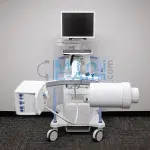
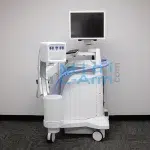
The Hologic Fluoroscan InSight 2 is a compact, fully digital mini C-arm and the value-tier replacement for the original Fluoroscan C-arm family. One of the best-selling Mini C-Arms of all time, it remains in active service at thousands of orthopedic practices and surgery centers across the United States. Its 6/4-inch image intensifier with a 0.045 mm focal spot, ultra-low-dose fluoroscopy, and built-in Metal-Trac technology make it a reliable, cost-effective choice for orthopedic, sports medicine, and podiatric procedures.
Minicarm.com provides certified-refurbished Hologic Fluoroscan InSight 2 units, OEM parts, and nationwide on-site service, giving customers access to factory-trained technicians, deep parts inventory, and long-term service coverage no matter where their system came from.
Available for sale, lease, or rent nationwide.
1 (800) 643-2998
The Hologic Fluoroscan InSight 2 is a compact mini C-arm imaging system designed specifically for orthopedic and extremity imaging. It uses a 6 inch image intensifier with a 0.045 mm focal spot, ultra-fine low-dose fluoroscopy, and built-in Metal-Trac technology that preserves image quality in the presence of pins, screws, and surgical instruments. The Hologic InSight 2 is the value-tier replacement for the original Fluoroscan C-arm family, manufactured from 2007 to 2017, and remains in active service at thousands of orthopedic practices and surgery centers across the United States.
Hosted by: Christopher Bacon, Co-Founder of Orthoscan and President of Minicarm.com
Today we’re going to take a look at the Hologic InSight 2 Mini C-Arm and show you basically how it works.
First, we’ll turn it on with the green button down here. That’s the power button. While it boots up, we’ll take a look at the C-arm’s articulation. This is about how low it goes, about knee height, and up approximately belly button level. We can rotate it here and back around the other way in our orbital rotation. This is pretty nice, about 120 degrees.
The machine has booted up here.
To begin, just tap Admin. Once we’re in, we’re going to show you how to go into Perform and Review. Always, when you’re shutting the machine down, use the Shutdown button on the screen, not the power button. That allows Windows to shut down properly and gives you fewer issues in the future.
Here’s the home screen. To start imaging, press Perform. You have to have at least one letter in each of the last name, first name, and patient ID fields. So we’ll just put in one letter here. It’s a touchscreen, which helps you navigate through all the different tabs. And then we’re going to Perform.
Hold the foot pedal down for at least one second. Also wait at least a second in between images. It just helps make sure that the machine runs smoothly.
Once you’re finished imaging, press the Review button. On your review screen, you can either select all, or you can select specific images by holding the Control button down and tapping the images you want. You can either print them or export them.
If there was a USB stick loaded on here, you’d be able to see it here and send your images as a DICOM, TIFF, or JPEG. You can also save them permanently to the system. When you’re finished, just press End Session. It’s going to give you a pop-up.
If you’ve already saved the ones you wanted, just go ahead and end the session. Then, when you want to make sure they’re there, select your case, press Review, and there are your saved images.
While X-raying, hold the button down for at least one second. This will give you the optimal image that this machine can produce. Also, in between presses, wait at least a second so the machine can properly process the images.
When you’re all finished using the machine, just hit the Shutdown button on the screen. Please do not use the on/off button to shut down. Pressing the Shutdown button allows Windows to shut down properly. After it’s shut down, please unplug it from the wall because there are components that are powered all the time when it’s plugged in.
That’s a quick overview of the Hologic InSight 2. For sales or service, please give us a call at 800-643-2998 or send us an email at info@minicarm.com. Thank you.
The Hologic InSight 2 is the cost-effective mini C-arm of choice for clinicians who need fast, low-dose extremity imaging across a range of clinical settings. Common applications include:
Hologic ended manufacturer support for the InSight 2, but your system is not on its own. Minicarm.com is the leading independent source for certified InSight 2 refurbishment, OEM parts, and nationwide on-site service, filling the gap the manufacturer left. 85% of issues are resolved through 24/7 phone and video support. When on-site service is needed, certified factory-trained technicians respond within 24 to 48 hours in most U.S. metro areas.
Request the Hologic InSight 2 Service Manual
| Spec | Hologic InSight 2 | Hologic InSight FD |
|---|---|---|
| Detector type | 6/4-inch image intensifier | 6x4-inch CMOS flat detector |
| Resolution | High-res digital | 2k x 1.5k |
| Monitor | Flat-screen LCD | HD touchscreen |
| Image storage | Local & EHR | Local & PACS |
| Best for | Value-tier extremity imaging | Flagship flat-detector imaging |
If you are running an InSight 2 today and looking ahead at multi-year capital planning, the Hologic InSight FD is the natural upgrade path. The FD adds a CMOS flat detector, 2k x 1.5k resolution, a HD touchscreen, and the lowest exposure rate of any mini C-arm. See refurbished Hologic InSight FD pricing.
Read the official end-of-life announcement: Hologic InSight 2 End-of-Life Notice.
Need a full datasheet? Download the Hologic InSight 2 Product Brochure or request the Hologic InSight 2 service manual.
Certified-refurbished Hologic InSight 2 mini C-arms from Minicarm.com start as low as $15,000 and run up to $30,000 depending on year, hours, warranty tier, and included accessories. Every refurbished system ships with a 12-month parts and labor warranty.
Mini C-Arm Rentals are available to accommodate testing/evaluation before committing to a purchase, or for surge coverage, clinical trials, and case-by-case projects. Monthly rental rates start in the low four figures.
Estimate monthly revenue and break-even timeline using our Clinical Reimbursement Calculator
Review our Mini C-Arm Buyer’s Guide
Learn more about financing options.
Please share your contact information and details about your needs, and one of our medical imaging experts will get in touch with you shortly. Not ready to buy yet or have questions?
The President of Minicarm.com is a co-founder of Orthoscan and has been the leading independent source for Hologic Fluoroscan mini C-arm sales and service in the United States. Every Hologic InSight 2 we sell is rebuilt with OEM parts by factory-trained technicians.
Hologic ended manufacturer support for the Fluoroscan InSight 2, but Minicarm.com continues to provide OEM parts, certified refurbishment, and on-site service nationwide. Service contracts up to 60 months are available.
Certified-refurbished Hologic InSight 2 mini C-arms start as low as $15,000 and typically range up to $30,000 depending on year of manufacture, hours of use, warranty tier, and included options. Call (800) 643-2998 or request a quote for an exact price.
Yes. The Hologic InSight 2 supports DICOM export to PACS, plus image export to USB, CD/DVD, and printer. Local digital image storage is built in for on-site review.
The InSight 2 uses a 6/4-inch image intensifier with a 0.045 mm focal spot and Metal-Trac technology. The InSight FD upgrades to a CMOS flat detector with 2k x 1.5k resolution, a HD touchscreen, and the lowest exposure rate of any mini C-arm. The InSight 2 is the value-tier extremity mini C-arm; the InSight FD is the flat-detector flagship.
Metal-Trac is Hologic’s proprietary image processing technology built into the InSight 2. It maintains contrast and edge definition when metallic hardware, including pins, screws, plates, and surgical instruments, is present in the imaging field. On older mini C-arms without Metal-Trac, metal objects cause blooming and artifact that force re-exposures. Metal-Trac eliminates that problem, delivering consistent image quality throughout fixation and reduction cases.