


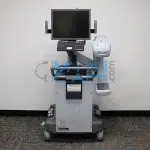
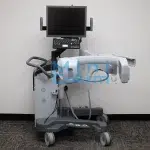
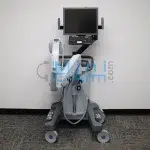
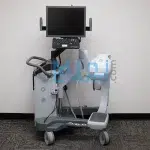
Looking for a different Orthoscan FD-family model? See the Orthoscan FD (standard surgical extremity ) or the Orthoscan FD Pulse (pulsed fluoroscopy, lowest dose).
The Orthoscan FD OR is a flat-detector mini C-arm built specifically for operating room integration. Its CMOS flat-panel detector delivers 2k x 1.5k resolution across a 6″x4″ field of view, while the thinnest detector housing in the mini C-arm category allows placement directly on the operating surface without pulling the C-arm out of the sterile field. Built-in sterile field lights and bilateral imaging controls give both scrubbed and non-scrubbed team members independent control at the surgical site.
The President of Minicarm.com is a co-founder of Orthoscan and although Orthoscan has ended manufacturer support for the FD OR, our team continues to provide certified-refurbished units, OEM parts, and nationwide on-site service.
Available for sale, lease, or short-term rent nationwide.
1 (800) 643-2998
6″x4″ CMOS Flat-Panel Detector, 2k x 1.5k Resolution
Hosted by: Christopher Bacon, Co-Founder of Orthoscan and President of Minicarm.com
Welcome to Minicarm.com. Today we’re going to take a look at the Orthoscan FD OR.
Powering On
To turn it on, press the green button. While it’s booting up, we’ll take a look at the C-arm articulation – this is how high it goes, this is how low it goes, and here is the orbital rotation lock.
Boot-up typically takes about a minute.
Starting an Exam
Once the system has booted, you can go right ahead and start imaging, or you can enter patient information first – last name, first name, ID, and any other fields you want to fill in. You can edit patient information at any time.
When you hold the foot pedal down for the first time, it will take about five or six seconds to acquire a good image. After that, the system responds much faster. Do not tap the foot switch repeatedly – hold it down for a second or two, release, wait a second or two, then reapply.
Bilateral Controls
The FD OR has bilateral two-pedal controls on both sides of the machine. You can initiate an X-ray from either side. The bilateral controls also allow you to rotate images clockwise or counterclockwise, tag images so they stay locked, increase or decrease technique, set technique back to auto, print or save, and cine record.
This is the only machine on the market that can light your sterile field. The sterile field lights are a simple toggle on and off.
Keyboard Functions
All keyboard functions are located along the top of the control panel. From the keyboard you can cine record, access case review, press Escape, save all, toggle still or motion capture, negate the image, flip the image, zoom, rotate the image, and manually increase or decrease technique.
Recall and Patient Information
The recall screen lets you select a prior case and review stored images. You can also modify patient information at any time using the Patient Info button. Editable fields include prefix, family name, first name, middle name, suffix, sex, date of birth, patient ID, scheduled date, physician, case description, session number, procedure ID, and worklist download.
Shutting Down
When you are finished, press the green power button and allow the system to shut down fully. Wait until the fans stop before unplugging. This allows Windows to shut down properly and protects the system from file corruption.
This has been an overview of the Orthoscan FD OR. For sales or service, call (800) 643-2998 or email info@minicarm.com.
The Orthoscan FD OR lives in operating rooms, where equipment downtime directly affects surgical schedules. The President of Minicarm.com is a co-founder of Orthoscan with hands-on experience with the FD OR and OR-environment service. Orthoscan has ended manufacturer support for the FD OR, but our team remains the only source for factory-level parts and certified service. 85% of OR-critical calls are resolved remotely through our 24/7 support line. When hands-on repair is needed, a certified technician is dispatched with a target arrival within 24 to 48 hours.
Every Orthoscan FD OR sold by Minicarm.com is rebuilt to OR-ready condition by Orthoscan-trained technicians. Refurbishment covers flat detector performance, sterile field light functionality, bilateral control calibration, C-arm mechanical integrity, electrical safety, and full cosmetic restoration.
Read the official end-of-life announcement: Orthoscan FD, FD OR, Mobile DI, and FD Pulse End-of-Life Notice.
| Model | Detector | Best For |
|---|---|---|
| Orthoscan FD OR | 6x4-inch CMOS flat panel, 2k x 1.5k | OR-integrated extremity surgery |
| Orthoscan FD | 6x4-inch flat detector, 2k x 1.5k | Standard surgical extremity |
| Orthoscan FD Pulse | 6x6-inch flat detector, 1.5k x 1.5k | Lowest dose, longest surgical cases |
| Orthoscan HD | 6/4-inch image intensifier, 1k x 1k | Beach-chair, standing-knee |
| Orthoscan UC | 6/4-inch image intensifier, 1k x 1k | In-office extremity, compact |
| Orthoscan Mobile DI | 6x4-inch flat detector, 2k x 1.5k | Portable (35 lb) |
For a deeper feature comparison, see the Orthoscan FD OR comparison review.
Need a full datasheet? Request the Orthoscan FD OR service manual from Minicarm.com.
Certified-refurbished Orthoscan FD OR systems are available through Minicarm.com starting between $30,000 and $40,000, depending on year of manufacture, hours of use, included accessories, and warranty tier. Each unit ships with a 12-month parts and labor warranty. Call (800) 643-2998 for current availability and exact pricing.
Lease terms run 24, 36, or 60 months with end-of-term purchase options. Operating leases keep the equipment off your balance sheet; capital leases qualify for Section 179 depreciation.
Orthoscan FD OR mini c-arm rentals are available for both short-term and long-term needs, including OR coverage during planned downtime, trial periods before purchase, and ongoing case volume support. Rental configurations include all standard OR accessories. Monthly rates depend on rental length and included accessories.
Estimate monthly revenue and break-even timeline using our Clinical Reimbursement Calculator
Review our Mini C-Arm Buyer’s Guide
Learn more about financing options.
Please share your contact information and details about your needs, and one of our medical imaging experts will get in touch with you shortly. Not ready to buy yet or have questions?
The President of Minicarm.com is a co-founder of Orthoscan. We deployed Mini C-Arms into operating rooms across the country, trained the original clinical teams, and are the only independent source for factory-level FD OR parts, service, and refurbishment in the United States.
Orthoscan has ended manufacturer support for the FD OR. Minicarm.com continues to provide OEM parts, certified refurbishment, and nationwide on-site service. Service contracts up to 60 months are available, and we service FD OR systems regardless of where they were originally purchased.
Both models share the same 6×4-inch flat detector and 2k x 1.5k resolution. The FD OR adds the thinnest detector housing in the mini C-arm category for direct on-table placement, built-in sterile field lights, and bilateral imaging controls accessible by both scrubbed and non-scrubbed team members. The FD is the general surgical extremity workhorse; the FD OR is purpose-built for operating room workflow.
No. The Orthoscan FD OR runs on standard 110 to 120VAC single-phase power and does not require a dedicated electrical circuit or special OR panel upgrade. A standard wall outlet is sufficient for most installations. If your facility has specific electrical requirements or is planning a new OR build-out, contact us and we can provide site requirements documentation ahead of delivery.
Pricing on certified-refurbished Orthoscan FD OR systems is typically $30,000 – $40,000. The final price depends on year of manufacture, hours of use, included accessories, and warranty tier. Call (800) 643-2998 or request a quote for current availability and exact pricing.
Yes. The FD OR was designed specifically for sterile-field compatibility. The thinnest detector housing in the category supports draping and on-table placement. Built-in sterile field lights eliminate the need to adjust OR lighting between positions. Bilateral imaging controls allow the scrubbed surgeon to trigger image capture without involving the circulator, keeping the sterile field intact throughout the procedure.