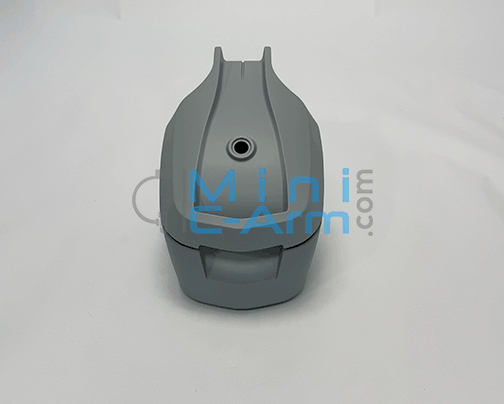
What Is the Orthoscan TAU 1512/1515 CPU Assembly — Gen 3, Windows 10 (915-0192)?
Product: Orthoscan CPU Assembly, TAU 1515/1512, Gen 3, Windows 10
Part Number: 915-0192
OS: Windows 10
The Orthoscan TAU 1512/1515 CPU Assembly — Gen 3, Windows 10 (915-0192) is the complete system computer assembly for the third-generation Orthoscan TAU 1512 and TAU 1515 Mini C-Arms running Windows 10. The CPU assembly is the core computing unit of the TAU system — it runs the Orthoscan imaging software, manages image acquisition and processing, controls the fluoroscopy and exposure parameters, and hosts the operating system and storage. This assembly is pre-configured with Windows 10 and the TAU imaging application, and is specific to the Gen 3 hardware revision of the TAU 1512 and TAU 1515 — earlier Gen 1 and Gen 2 TAU units and the TAU 2020 use different CPU assemblies that are not interchangeable with this part. A failed CPU typically presents as failure to boot, system crashes or freezes during imaging, application errors, corrupted or missing imaging data, or a system that powers on but does not reach the imaging software. Because the CPU assembly contains the operating system and application software pre-configured for the TAU platform, replacement requires re-pairing the new CPU with the system and confirming calibration. Call (800) 643-2998 with your model, serial number, and hardware generation before ordering to confirm this is the correct assembly for your unit.
Compatible Systems
Generation 3 TAU 1512/1515 only. This CPU assembly is not compatible with Gen 1 or Gen 2 TAU 1512/1515 units, or with the TAU 2020. CPU assemblies are hardware-generation specific and not interchangeable across generations. Always confirm your TAU generation by calling (800) 643-2998 with your serial number before ordering. Incorrect CPU installation can result in system incompatibility and imaging failure.
Why Source This Part From Minicarm.com?
✓ Founded by the Founder of OrthoscanChristopher Bacon co-founded Orthoscan, Inc. and designed the x-ray tube head used in the first five generations of their machines. You're buying from the experts.
✓ 30-Day Warranty on Every PartEvery part ships with a 30-day industry-standard warranty. If there's an issue, we make it right — no runaround.
✓ Same-Day Shipping AvailableCall before 5PM EST and we'll do our best to get your part out the same day.
✓ 4.9 Stars on Google (60 Reviews)Medical imaging professionals across the country trust Minicarm.com for parts, service, and support.
Need Installation Help?
Our certified field service engineers are available nationwide. Learn more about our service options or call (800) 643-2998 to schedule.
Order Information📦 All parts are sold based on exchange.🔄 Return Policy: All sales are final. Parts are non-returnable.🛡️ Warranty: 30-Day Industry-Standard Warranty❓ Questions? Contact us at minicarm.com/contact-us or call (800) 643-2998. Frequently Asked Questions
What symptoms indicate a failing CPU assembly on the TAU?+
Common symptoms include failure to boot past the BIOS or OS startup screen, system crashes or freezes during imaging, application errors or software crashes within the Orthoscan imaging program, corrupted or missing image data, and a system that powers on normally but does not reach the imaging software. Because many of these symptoms can also indicate a failing hard drive or SSD rather than the CPU itself, storage should be ruled out as a cause before ordering a CPU replacement.
How do I confirm my TAU is a Gen 3?+
Hardware generation can be confirmed from the system serial number or by calling Minicarm.com at (800) 643-2998 with your serial number. Our engineers can identify your TAU generation and confirm whether 915-0192 is the correct CPU assembly for your specific unit before you order.
Can Minicarm.com install this part for me?+
Yes. CPU replacement on the TAU requires re-pairing the new assembly with the system and confirming imaging calibration — we strongly recommend professional installation. Minicarm.com offers nationwide field service with certified TAU engineers. Call
(800) 643-2998 or visit our
service page to schedule.
What does sold on exchange mean?+
Exchange means you return your defective core unit when you receive the replacement. This helps keep costs down and ensures defective units are properly refurbished. Our team will provide return instructions with your order.
How quickly can I get this part shipped?+
Same-day shipping is available on in-stock parts when ordered before 5PM EST. Call (800) 643-2998 to confirm availability and arrange shipping.
Need More Orthoscan TAU Parts or Service?
Browse our full inventory of TAU 1512 and TAU 1515 parts — CPU assemblies, cables, umbilicals, monitor harnesses, and more.
Browse Orthoscan Parts