
Advanced flat-detector Mini C-Arm imaging for orthopedics, surgery centers, and outpatient facilities – available refurbished, used, or for rent from Minicarm.com.
Orthoscan Mini C-Arms are trusted worldwide for high-resolution extremity imaging, ergonomic design, and low radiation dose. At Minicarm.com, we offer three industry-leading Orthoscan FD models – FD, FD-OR, and FD Pulse – each designed to meet specific clinical and workflow needs.
The original flat-detector Mini C-Arm – compact, reliable, and cost-effective.
The Orthoscan FD was the first Mini C-Arm to introduce flat-detector technology, setting a new benchmark for extremity imaging. Its slim profile, ergonomic controls, and excellent image quality make it a proven solution for surgery centers, hospitals, and outpatient clinics.
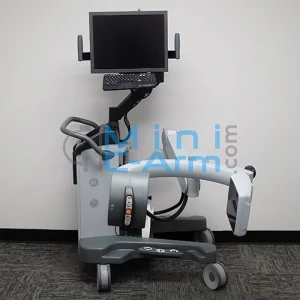
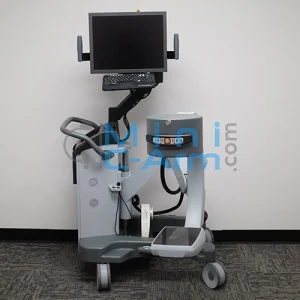
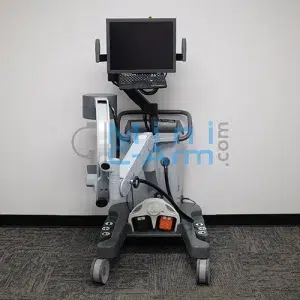
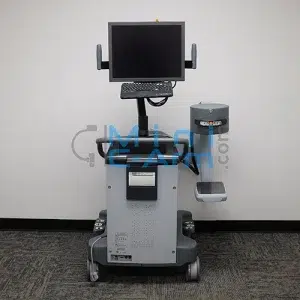
The Orthoscan FD is best suited for facilities that need reliable extremity imaging with a compact footprint and straightforward operation.
Best for: Practices seeking a proven, affordable flat-detector Mini C-Arm for everyday extremity imaging.
Detector & Imaging
Display & Controls
X-Ray Generator
System & Connectivity
Physical Design
Designed for the operating room – precision extremity imaging with enhanced maneuverability.
The Orthoscan FD-OR Mini C-Arm is purpose-built for surgical environments where space, sterility, and positioning flexibility matter most. With its ultra-thin flat-panel detector and wide orbital rotation, it delivers exceptional image quality without compromising workflow.


The Orthoscan FD-OR is designed for surgical environments that demand precise positioning, sterility, and efficient intraoperative imaging.
Best for: Surgical teams that need flexibility, sterility, and precision during extremity procedures.
Detector & Imaging
Imaging Performance
Controls & Workflow
Display
X-Ray Generator
C-Arm Movement & Geometry
System & Connectivity
Physical Dimensions
The most advanced Mini C-Arm available – unmatched dose reduction and image clarity.
The Orthoscan FD Pulse stands alone as the first Mini C-Arm with pulsed fluoroscopy. Featuring the largest flat detector in its class and advanced dose-reduction technology, it delivers exceptional image quality while significantly lowering radiation exposure.


The Orthoscan FD Pulse is ideal for facilities that prioritize advanced imaging performance, radiation safety, and high procedural throughput.
Best for: Practices that want premium Mini C-Arm performance with the lowest possible dose.
Detector & Imaging
Imaging Performance
Controls & Workflow
Display
X-Ray Generator
C-Arm Movement & Geometry
System & Connectivity
Physical Dimensions
Orthoscan Mini C-Arm systems support portable, point-of-care imaging that helps reduce delays and keep orthopedic imaging moving efficiently. With high resolution extremity imaging, fluoroscopy imaging, and low-dose imaging for hand and wrist imaging and other small bone applications, Orthoscan helps practices improve workflow, speed decision-making, and deliver care without sending patients elsewhere for imaging.
When you purchase or rent an Orthoscan Mini C-Arm from Minicarm.com, you gain more than equipment – you gain a long-term partner and comprehensive Mini C-Arm support:
Minicarm.com offers flexible acquisition options to help you add the right Orthoscan Mini C-Arm to your facility without disrupting your budget or workflow.
Typical Price Range: $25,000 – $55,000
Pricing varies based on model, configuration, condition, and warranty coverage.
Contact us for an exact quote and availability.
0:04 – Hey guys, I'm Christopher Bacon, the founder of OrthoScan and the president of Minicarm.com.
0:08 – Today we're going to go over the OrthoScan FD, which is the first flat panel system.
0:17 – To turn it on, just press the power button up here on top of the chassis.
0:23 – It takes about a minute or so for it to boot up.
0:27 – We'll go over some articulation of the C-arm.
0:30 – This is about how low it goes.
0:33 – And the height.
0:35 – And here’s our orbital rotation.
0:45 – And the wig-wag too.
0:52 – All right, so we're going to use our hand phantom to do some imaging.
0:56 – There is a laser button up here that gives you crosshairs approximately in the middle of the field of view.
1:06 – As you can see, it takes approximately three seconds to get yourself a nice image.
1:11 – Please don’t just tap or you'll get an unsatisfactory image.
1:18 – Also wait approximately a second before you initiate another fluoroscopy.
1:24 – This gives the machine time to populate the last image hold area.
1:33 – Here we can see the two pad controls.
1:39 – X-ray.
1:41 – Rotate clockwise or counterclockwise.
1:45 – You can change the technique to go up or down.
1:49 – You can also tag your images.
1:54 – You can also print and save all your imaging.
1:58 – If you want to rotate the image, you can use the clockwise or counterclockwise image rotate buttons.
2:06 – You can also flip the image.
2:09 – It’s just a toggle.
2:12 – Negate changes it to look like an x-ray.
2:14 – You can change the edge.
2:17 – It changes the bone grain, basically.
2:21 – We usually keep it on low.
2:24 – When you're finished with the case, press Case Review.
2:30 – Here you can save specific images by using the arrows to navigate through.
2:39 – If you want to save this image, press the space bar so it says “Tagged.”
2:45 – Say you want to save this one as well.
2:49 – Then you can come down here and click Save All.
2:56 – And they’re saved.
2:58 – To review all the cases you have on the machine, press the Recall button.
3:04 – Press the Enter button to open it up.
3:08 – Then you can navigate through.
3:10 – You can print from here.
3:13 – You can send a DICOM.
3:16 – You can USB save them.
3:19 – When you're all done imaging and have your images saved, press the green power button.
3:25 – Wait for the fans to shut down.
3:27 – You’ll hear them shut down.
3:29 – Then unplug it from the wall.
3:31 – The reason you do this is to let Windows shut down properly.
3:37 – This is an overview of the OrthoScan FD.
3:40 – If you need sales or service, please give us a call at 800-643-2998.
3:44 – Or send us an email at info@minicarm.com.
3:47 – Thank you.
Minicarm.com is not affiliated with or endorsed by Orthoscan. All product names, logos, and trademarks are the property of their respective owners and used for identification purposes only.